Flash Game — Spinner/Slider specification
Overview/Goals
Flex or Flash developer wanted to complete a Flex/Flash graphical control component for an online board game.
The user interface component is a game spinner, like those used in typical board games. The game is for players from age five through adult, and the purpose is music education.
- A partially functional prototype exists, and is shown and described below.
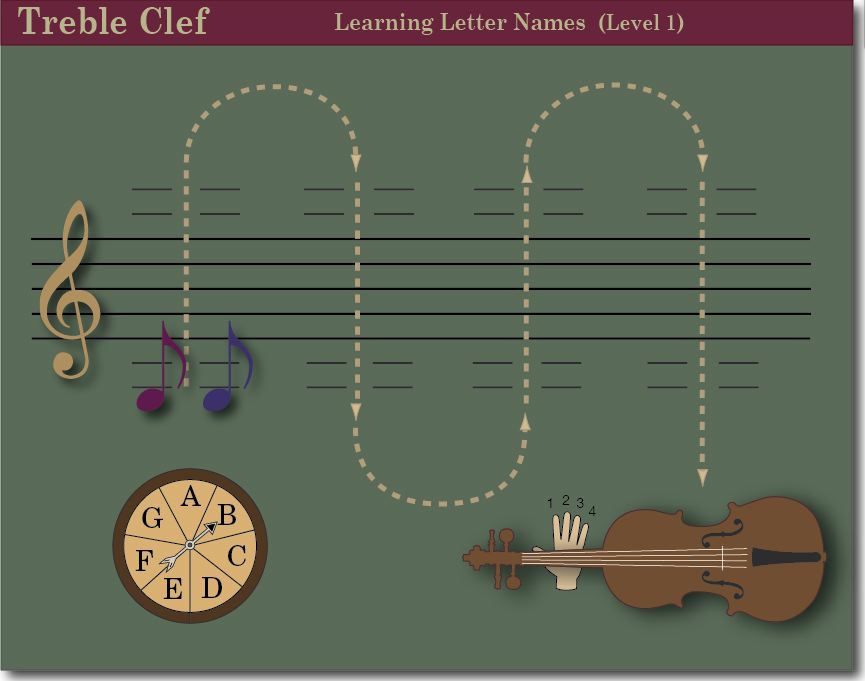
- An image of a proposed game board is at the bottom of this page (a much simpler board may be used)
Developer will be an independent contractor, contracting a price for the entire spinner project.
Spinner/slider prototype
The Spinner/Slider prototype has the following characteristics:
- vector graphics of acceptable design quality
- interactivity:
- a slider thumb that the user drags (within vertical and horizontal constraints)
- the thumb returns to center on mouse up, with an 'ease' effect
- the spinner arrow responds to a mouse release of the thumb, spinning and coming to rest with a elastic effect
You can view and try the prototype spinner below ...
And you can try a version of the spinner that resizes with the dimension of your browser window
The spinner/slider development goals:
The developer may use existing graphics and code as a starting point, and is to create a spinner object in an Flash or Flex ActionScript 3.0 file (.ai) while addressing the following goals:
Design and construct the completed slider and spinner entirely with vector graphics (unless there is a compelling reason to use pixel graphics.) Presently all of the spinners display objects are vectors.
All slider/spinner parts easily skinnable, preferably by CSS (or via Flash Catalyst)
(i.e. the presentation is easily redefined by a CSS reference ... or changed by attribute):
- allow the arrow image, text labels, background color to be skinned
- allow the slider thumb, track, background rectangle to be skinned
The spinner object will have following properties and methods:
- a list of text labels that are displayed proportionally around the circle (presently this is just A, B, C ...). This list can contain an unlimited number of labels. (The labels are center aligned ... to position them properly it may be necessary to determine the height and width of each label text.)
- a distance parameter that governs how close the labels are displayed relative to the center of the spinner circle
- fontSize, fontStyle and fontFace properties for labels, or a reference to a CSS file that describes these properties
- color parameters for background color, arrow color, slider background color, thumb color — or an easy way of skinning the controls with alternate graphics.
- a reference to one or more "click" sounds.
- parameters for custom easing. For instance, so most of the tween occurs near the end of the end of the tweens duration.
- pass in an easing function* as a parameter? (the docs I looked at included only five classes: Back, Bounce, Circular, Cubic, Elastic, but now I see five more: Exponential, Linear, Sine, Quadratic, Quartic, Quintic
http://livedocs.adobe.com/flex/3/langref/mx/effects/easing/package-detail.htmlhttp://livedocs.adobe.com/flex/3/html/help.html?content=behaviors_08.html
The spinner must contain methods that ensure that:
- the arrow will always come to rest at one of the text labels
- a maximum rate of spin is ensured
- the amount of spin corresponds proportionally to the position of the slider at mouse up. The greater the offset from center, the greater the amount of spin: also faster speed, and greater duration.
- dragging the thumb results in a proportional "wind up" of the spinner arrow (in the opposite direction to the impending spin) similar to the fixed "wind up" in the prototype.
- a currently playing animation (such as rotation tween) reacts logically to a new spin that interrupts the executing tween. (I think it's possible to get the duration of the tween as a result of the tween function; so it's possible to disable the slider until the tween has completed.)
- Optional:An audible click occurs as the arrow rotates past each label (A, B, C ...)
- on mouseUp the arrow spins—spins longer for a long drag and spins less for short drag, but somewhat randomly
The user will be able to:
- click the thumb (or press s or spacebar) to make a random spin
- drag the thumb downward to prepare for a clockwise spin, with the arrow cocking counterclockwise slightly on drag.
- drag the thumb upward to prepare for a counterclockwise spin, with the arrow cocking clockwise slightly on drag. (Presently an upward drag calls the clockwise function.)
- mouseDown on the slider track. This will quickly move the thumb to that location (as always, on mouseUp the thumb relocates to centered position, with an ease effect.)
- Alternately, allow the user to drag the arrow, and have the thumb slider react. Tracking and translating circular motion may be difficult— note the way radial knobs react to mouse movement in the mixers of various digital audio applications. Many only react to purely vertical or purely horizontal movement.
The musical "board game" concept
Ultimately the game will look something like the illustration below.
It is undecided if play will proceed along the "m" path as indicated in the image here. I think it would be fine to have play go straight up and down, or follow an "n" path ... a simple yet extensible approach is best for version 1.0. Please note, creation of the board, play logic, and interaction is a separate project, and not part of this specification. This specification is just about the spinner.
Contact
flashDesign@theorecticallycorrect.com
Links on this page: gameboard