Low Latency Monitoring
How to achieve low latency monitoring in a digital audio workstation when overdubbing ... without using an expensive audio interface.
Though the rewards of digital audio are many, my initial disappointment came immediately after I put on my headphones and record-enabled a track.
Everything seemed right. I had my headphones plugged into the computer headphone jack. The MOTU 2408 audio interface was functioning properly. The mic was live. The software settings were optimized for low latency monitoring, but for every sound that reached the mic there returned an echo through the software monitor. This infamous delay/echo issue is called latency, "monitor latency" to be precise.
The situation was quite disturbing, and I couldn't proceed with my project until I solved this problem. I had never encountered this monitoring issue on analog systems I had used in the past.
I assumed perhaps I had configured the MOTU 2408 hardware incorrectly, but it turns out no onboard solution existed for that device. All sources claimed a remedy would require the use of alternate hardware. But I would soon discover a simple solution by monitoring at a different point in the audio chain. And you may want to do so if you encounter a disturbing or even noticeable amount of latency and can't find a software solution.
In a nutshell, I recommend including a mixer in your audio chain and monitoring your input source at the mixer ... or if you audio interface allows, simply monitor there. This article shows a number of ways to do so. Jump to the illustrations below if you want to get to the crux of it without reading the provided explanations.
Software manufacturers promise low latency or "zero latency" via software settings, and that can reduce the issue, but I always found that those solutions taxed the computer, and didn't resolve the issue sufficiently.
The prevalence of audio monitor latency issues
Monitor latency is pretty a relative complicated topic, and it blindsides and frustrates most people when they first set up in their home digital recording studios. Pretty much everyone bumps their head on this issue, so if you're here reading this, welcome to the club.
Click this link to see how often low-latency monitoring is discussed. And though "zero-latency" is technically impossible, see how often zero-latency monitoring is discussed.
The best article I've read to date is on the PreSonus site.
It'll whack you upside your greatest musical sensibility
Musical timing is of the utmost importance to me, and the delayed monitor signal made accurate overdubbing virtually impossible. Recording artists should be as comfortable as possible when recording, and above all, that means working in an environment that allows them to overdub their instrument or vocal in sync with previously recorded tracks.
When searching for solutions I've encountered a couple of significant surprises:
- lots of people are willing accept a significant level of latency as something unavoidable. Again and again I've heard people say that they learned to compensate for the heard delay, and suggested that I learn to do so. If like me, you want NO part of that, read further to learn about acceptable low latency solutions. Or if you're good at audio chain schematics, jump down to the images below.
- many solutions proposed in user manuals (and on the web) relay on software sample buffer settings, but these usually fail to completely address the underlying problem.
- a number of people told me I needed a faster computer. I suggest you ignore such advice! That would not have resolved the issue for me, nor would have a more expensive digital audio interface of the day, which was also recommended. (But it's really easy to make such suggestions.)
- eventually I decided to take my project someone who had completed lots of digital projects. But in that session, I encountered worse latency than on my system. Then I found awkward and acceptable latency at a professional studio. These recording engineers told me "It sucks, but that's what we all live with for now."
Understanding and reducing latency
In this section we'll look at the nature of latency, what causes it, and various methods for eliminating it. In general we'll explore inexpensive solutions that only require:
- some specific hardware wiring (with and without an optional mixer)
- muted output on any record-enabled tracks in your multi-track audio software
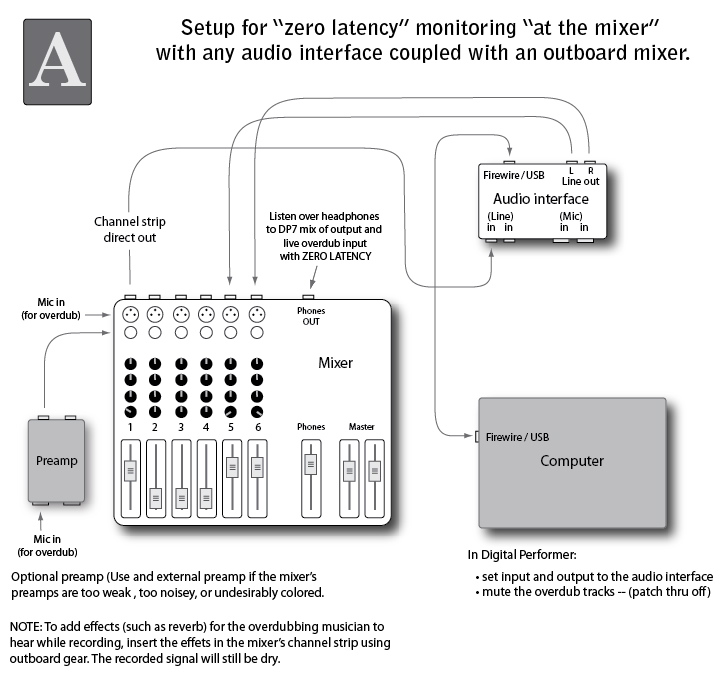
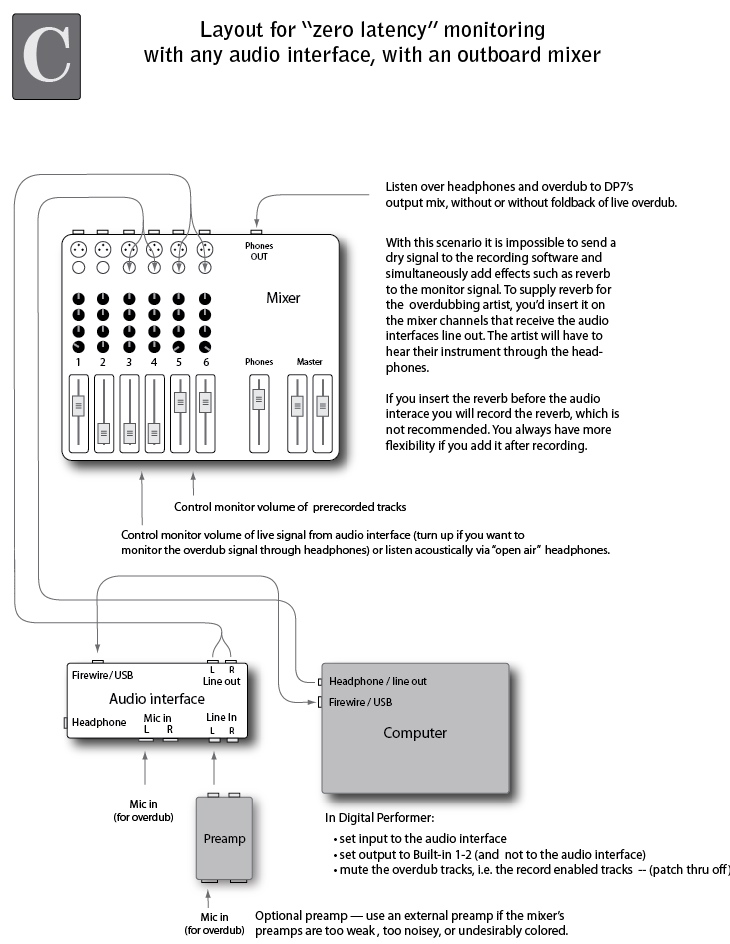
If you want to jump ahead to the three solutions, they are here: a, b, c
The latency loop
Monitor latency occurs when an audio signal runs through the computer and back to you. That trip takes time. If it takes more than 30 or 40 milliseconds, you will hear two separate sounds:
a) the sound you make
b) the return of the sound you made (the latency echo)
Latency solutions
There are a number of a solutions to monitor latency, all of which require monitoring "direct" at the interface or "monitoring at the mixer"— in essence this means, "sending the input signal directly to the headphones AND not listening to it through the recording software.
I will illustrate the topic of "monitoring at the mixer" here in great detail. It's relatively simple to create a manageable setup, depending on your needs. I provide a few diagrams for various scenarios below.
NOTE: It's important to understand that any electronic circuit will have some amount of latency. Zero-latency would be idea, but it takes time to move stuff—even electrical impulses along a wire. Low-latency is considered acceptable when the delay ia below the threshold of human perception. Audio mixers usually have a 4 to 6 ms latency—and while that amount of latency is not humanly perceptible, it may add some phase shift coloring to the tone of the sounds; however, even if this occurs in monitoring, it will not affect the recording, unless you go to some lengths to route it back in!)
Also, most digital audio recording systems tout "software based" low-latency. This relies on reducing the size of the audio buffers, and in my opinion this is NOT an ideal solution.
Here's solution B, the simplest setup, which I will return to in greater detail.
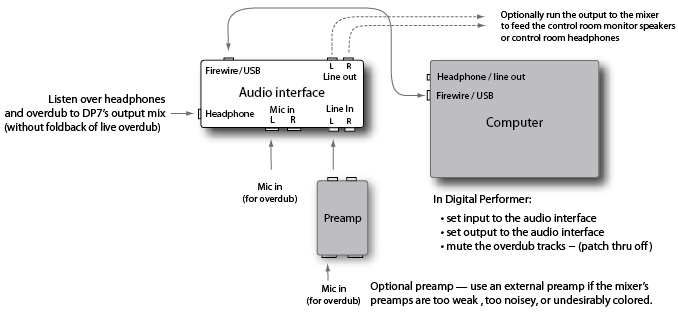
Monitoring "at the mixer"
Latency usually enters the threshold of perception when you have a delay longer than 30ms to 60ms. When monitoring overdubs even minor latency becomes painfully apparent. The latency delay is a problem when trying to play along with prerecorded material, a metronome, or drum "click-track" within the audio software.
When I first encountered latency I thought I would find a software setting that would entirely alleviate the latency. Not so in my experience; computers just aren't fast enough. My very expensive MOTU 2408 audio interface was unable to eliminate latency because (as an early generation audio interface, and like many of its audio interface peers) it did not have hardware patch through; in other words it had no built-in mixer.
One solution involved hooking up an outboard mixer so I could monitor at the mixer. This allowed me to quickly and comfortably finish my initial project. However, I'll begrudgingly say, I never expected that I would need a to use and external mixer to comfortably overdub; relying on a mixer complicates my setup and makes it less portable. But it works, and with a mixer and a few cables you'll be able to duplicate one of the scenarios illustrated here.
We're all looking for solutions
In my search for a solution to monitor latency I discovered that there were lots of people struggling to resolve or work around audio software latency:
- they were attempting solve the problem using (vendor recommended) software settings, which were usually futile, and barely addressed the problem
- many veered close to a solution but remained off track because they were unclear on one or more key contribution factors (primarily that at various points in the chain, there are places where the signals meet simultaneously, and these are the places where you can monitor without latency).
- many merely tried to adapt their playing, in other words, they tried to adapt and play ahead of the audio they were trying to overdub to. This is exactly what I was unwilling to do, because it is utterly distracting and it interferes with the artistic process, which for me it largely about timing. For me it's listening to someone misspell words in my ear while I'm trying to recite poetry, or having someone with trembling hands hold a canvas I'm trying to paint on.
- understandably some people simply gave up, or resorted to buying an expensive audio interface. I'm not against purchasing the latest equipment—there are some real rewards to that—but I think anyone should be able to record with low cost equipment, or whatever is on hand.
What's an acceptable level of latency?
The Hass Effect states that:
- if two sounds occur within 30 to 40ms the listener will not hear two distinct sounds. This suggests that the nervous system has a "frame rate" and when sounds occur within 30 to 40ms, it packages them into a single perceived sound.
- the perceived sound may be colored by a slight phase shift
- the acoustic timber of first sound will dominate the tonal "color" ... so you mainly hear the first sound and some shadow or tail of the second.
In my personal experience all of these Hass Effect premises are true. And I've witnessed countless people perceive these effects.
Specifications and buffers
Vendors of digital audio software and hardware tout "low latency", promising delays as low as 12 milliseconds, achieved by lowering the audio buffers in the audio software, and that this can be WITHOUT using a mixer!
The promise of sub 12 millisecond latency is exciting. An analog mixer has a latency of 3 to 5ms, and that's never bothered me! So, if we accept the Hass Effect premise, 12ms latency should be more than acceptable. But my experience with low latency promises consistently contradicts industry claims of 12ms latency.
At best, by lowering buffers, I hear latency in the 100ms range, which is a whopping tenth of a second! Unfortunately lowing the buffers may cause the unpleasant side effect of dropping samples during playback. So in my experience, buffer twiddling fails to actually adequately address the initial problem of latency, and it may cause the side effect of dropped samples. Not a win-win situation.
More realistically manufacturers now hawk their hardware latency solutions. (Um, because software solutions don't really work?) The new professional interfaces indeed offer low latency simply because they include a built-in mixer, thereby allowing you to monitor "at the mixer" within the audio interface. Additionally these mixers usually have access to onboard effects software that allows you to insert effects like reverb, thus providing an excellent monitoring environment for overdubbing. But at a price, usually from $500 to $1000+.
Resolving monitor latency
But what if you want to record and overdub with whatever equipment is available? It is possible to eliminate latency with any setup, without spending big $$$ to create a working home studio. And that's what the remainder of this article is about.
To resolve latency all you really need is:
- an audio interface with a line out (most any audio interface in the $100 range will have XLR mic inputs, line level inputs, a headphone jack, and a USB or FireWire connection
- the addition of a simple mixer provides other options as well
For a software standpoint, the real key is muting the record enabled track, so it is not sent to you monitor outputs, like Built-in Output 1-2. This is how you eliminate the foldback of the live input, the source of the latency.
NOTE: My diagrams refer to Digital Performer (by MOTU). This is one of the top multi-track digital audio applications for recording, editing, and mixing audio. But anywhere I say Digital Performer, the same logic applies if you are using any top tier DAW (digital audio workstation) application, such as:
- Pro Tools (by Avid)
- Logic, and GarageBand, its surprisingly powerful little sibling (by Apple)
- Cubase
- NOTE: It's exciting to know that BIAS (maker of Peak) is releasing an multi-track application in Q2 2011
That's all for now, though I plan to write more on the pros and cons of the various solutions I've diagramed below.